MediaWiki:Common.js
MediaWiki:Common.js 是 全站全局 JS,所有页面都会加载,适合放:
- 百度统计、谷歌统计、51LA 等统计代码
- 自定义 UI、弹窗、悬浮按钮、美化 JS
- 第三方插件 JS
再整理,再出发,人生是一段不休的自我救赎……
MediaWiki:Common.js
MediaWiki:Common.js 是 全站全局 JS,所有页面都会加载,适合放:
MediaWiki副标题,SEO
MediaWiki:Sitetitle
MediaWiki:Pagetitle
MediaWiki:Common.js
MediaWiki:Sitenotice 在电脑端和手机端显示不一样,主要有几个常见原因:
MediaWiki:SitenoticeMediaWiki:Mobile-Sitenotice 页面MediaWiki:Sitenotice,那么手机端可能不会显示,或者显示样式完全不同。MediaWiki:Sitenotice 里写了 HTML + CSS,可能桌面端能对上 class,手机端就跑偏了。div、id 都和 Vector 不一样。MediaWiki:Common.js / MediaWiki:Mobile.js / MediaWiki:Vector.js 来控制内容展示。sitenotice 是有缓存的。?action=purge 或 ?cache=purge)后再看。✅ 解决方案建议:
MediaWiki:Sitenotice 和 MediaWiki:Mobile-Sitenotice,保持内容一致。MediaWiki:Common.css 里加针对皮肤的选择器,比如: body.skin-vector #siteNotice { ... } /* 桌面版 */ body.skin-minerva #siteNotice { ... } /* 手机版 */下载该软件新版本的文件。这些文件可以以来自维基媒体下载服务的压缩“tar”存档
(https://releases.wikimedia.org/mediawiki/).您也可以直接从我们的Git源代码存储库获取新文件。
用新的文件替换现有的MediaWiki文件。你应该保留LocalSettings.php文件以及“extensions”和“images”目录。
根据配置,可能还需要保留其他目录,自定义上传目录($wgUploadDirectory),已删除的文件存档,以及任何自定义皮肤。
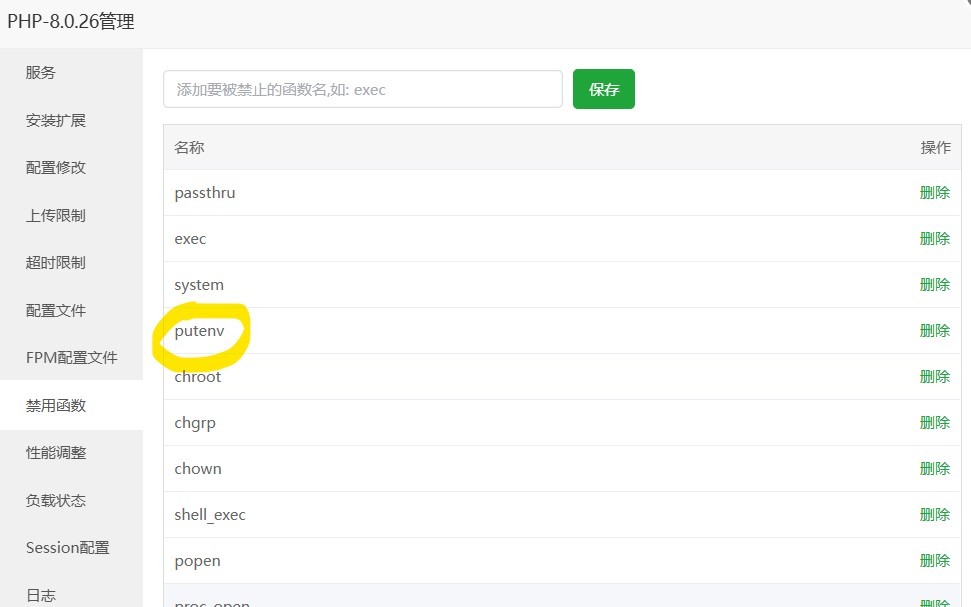
Fatal error: Uncaught Error: Call to undefined function putenv() in /www/wwwroot/www.emc.wiki/includes/Setup.php:174 Stack trace: #0 /www/wwwroot/www.emc.wiki/includes/WebStart.php(90): require_once() #1 /www/wwwroot/www.emc.wiki/index.php(44): require(‘…’) #2 {main} thrown in /www/wwwroot/www.emc.wiki/includes/Setup.php on line 174
Installing some PHP extensions is required.
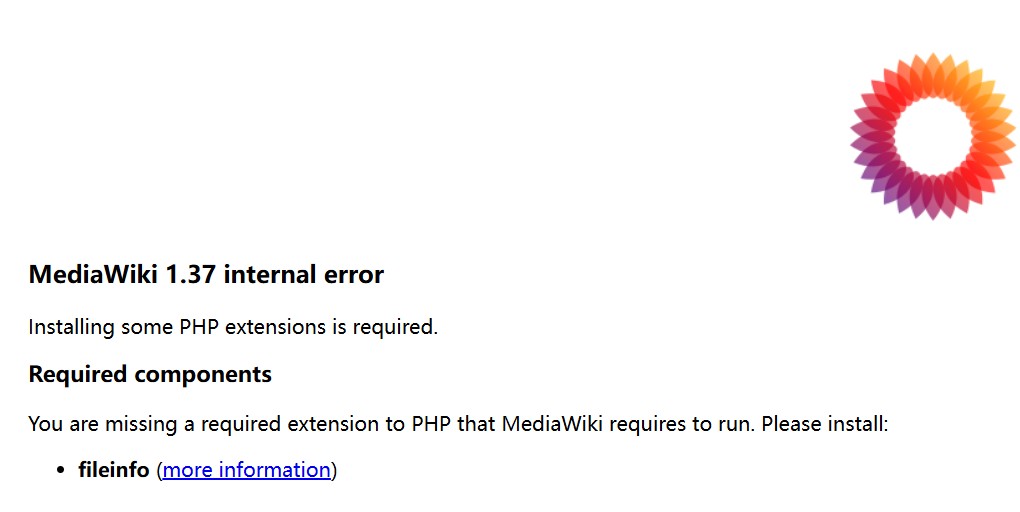
You are missing a required extension to PHP that MediaWiki requires to run. Please install:
MediaWiki网站底部,添加自定义链接、备注!
// Add a link to this page (https://www.mediawiki.org/wiki/?curid=6031)
// Add a link to this page (https://www.mediawiki.org/wiki/?curid=6031)
// test-desc is an i18n message of the text
$wgHooks['SkinAddFooterLinks'][] = function ( Skin $skin, string $key, array &$footerlinks ) {
    if ( $key === 'places' ) {
        $footerlinks['test'] = Html::element( 'a',
            [
                'href' => 'https://www.mediawiki.org/wiki/?curid=6031',
                'rel' => 'noreferrer noopener' // not required, but recommended for security reasons
            ],
        $skin->msg( 'test-desc' )->text()
        );
    };
};
//添加广州为电技术有限公司版权
// Add a link to this page (https://www.mediawiki.org/wiki/?curid=6031)
// test-desc is an i18n message of the text
$wgHooks['SkinAddFooterLinks'][] = function ( Skin $skin, string $key, array &$footerlinks ) {
if ( $key === 'places' ) {
$footerlinks['test'] = Html::element( 'a',
[
'href' => 'https://iec.wiki/',
'rel' => 'noreferrer noopener' // not required, but recommended for security reasons
],
$skin->msg( '广州为电技术有限公司 © 2024 All rights reserved.' )->text()
);
};
};
$wgHooks['SkinAddFooterLinks'][] = function( $skin, $key, &$footerlinks ) {
       if ( $key === 'places' ) {
               $footerlinks['ICP_Number'] = Html::rawElement( 'a', [ 'href' => 'https://beian.miit.gov.cn/' ], '粤ICP备15102220号' );
       }
};
$wgHooks['SkinTemplateOutputPageBeforeExec'][] = function( $sk, &$tpl ) {
$tpl->set( 'ICP_Number', Linker::makeExternalLink( 'https://beian.miit.gov.cn/', '你的备案号' ) );
$tpl->data['footerlinks']['places'][] = 'ICP_Number';
return true;
};location ~ ^\/.+$ {
if ($request_uri ~ ^/resources) { break; }
if ($request_uri ~ ^/images) { break; }
if ($request_uri ~ ^/skins) { break; }
if ($request_uri ~ ^/index.php) { break; }
if ($request_uri ~ ^/favicon.ico){ break; }
rewrite ^/(.+)$ /index.php?title=$1 last;
}$wgScriptPath = "";
$wgArticlePath = "$wgScriptPath/$1";
$wgUsePathInfo = true;
$wgScriptExtension = ".php";对nginx的rewrite文件写入如下内容,如果是宝塔面板,那么如下图所示添加,并保存。
location ~ ^\/.+$ {
if ($request_uri ~ ^/resources) { break; }
if ($request_uri ~ ^/images) { break; }
if ($request_uri ~ ^/index\.php) { break; }
rewrite ^/(.+)$ /index.php?title=$1 last;
}
or
location ~ ^\/.+$ {
if ($request_uri ~ ^/resources) { break; }
if ($request_uri ~ ^/index\.php) { break; }
rewrite ^/(.+)$ /index.php?title=$1 last;
}

然后再在 LocalSettings.php文件里面添加如下代码
# 伪静态
$wgScriptPath = "";
$wgArticlePath = "$wgScriptPath/$1";
$wgUsePathInfo = true;
$wgScriptExtension = ".php";